Best Mini PCs for Home Offices, Media Centers, and Everyday Computing
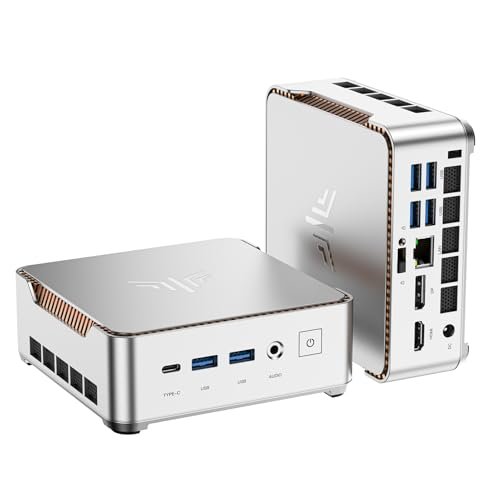
The category includes everything from affordable systems designed for web browsing to powerful machines capable of video editing, software development, and local AI workloads. The challenge is comparing complete computers with barebones models that may not include memory, storage, or an operating-system license.
The following mini PCs cover five distinct use cases. Prices and configurations change frequently, so verify the exact processor, memory, storage, and operating system before placing an order.
| Mini PC | Best For | Processor Platform | Upgrade Consideration |
|---|---|---|---|
| Apple Mac mini | Best overall for Mac users | Apple M4 or M4 Pro | Memory and storage are not user-upgradeable |
| ASUS NUC 15 Pro | Business and upgradeability | Intel Core Ultra Series 2 | Available in different kits and configurations |
| Beelink SER9 Pro | Windows performance and value | AMD Ryzen options | Some versions use soldered memory |
| MINISFORUM AI X1 Pro | Creators and demanding users | AMD Ryzen AI 9 | Check whether the listing is barebones or complete |
| GEEKOM A5 | Affordable everyday computing | AMD Ryzen 5 | Older platform but practical specifications |
1. Apple Mac mini: Best Overall for Mac Users
Best for: Home offices, content creation, software development, and users already invested in Apple products.
The Apple Mac mini combines strong performance with one of the smallest designs in the category. The current model is available with Apple’s M4 or more powerful M4 Pro chip.
Its five-by-five-inch enclosure includes front USB-C connections and a headphone jack, while the rear provides HDMI, Ethernet, and three Thunderbolt ports. Apple states that the Mac mini can drive as many as three displays, although supported resolutions depend on the selected processor.
The standard M4 model is more than adequate for office applications, web publishing, accounting, photo management, coding, and moderate video editing. The M4 Pro is better suited to developers, professional creators, and users working with larger data sets or demanding production software.
Integration with the iPhone is another advantage. Features such as AirDrop, Universal Clipboard, phone calls, messaging, and iPhone Mirroring can improve daily productivity for existing Apple users.
Potential drawbacks: Memory and internal storage cannot be upgraded after purchase. Select enough capacity at checkout and remember that a monitor, keyboard, and mouse are sold separately. Windows-only applications may also require an alternative computer or virtualization solution.
2. ASUS NUC 15 Pro: Best for Business and Upgradeability
Best for: Offices, managed deployments, kiosks, multi-monitor workstations, and buyers who want replaceable components.
The ASUS NUC 15 Pro is a compact business-oriented computer based on Intel Core Ultra Series 2 processors. Selected configurations include Intel vPro capabilities for enterprise security and remote management.
The system supports dual-channel DDR5 memory, with ASUS listing support for up to 96GB on compatible configurations. Its tool-free chassis makes memory and storage upgrades easier than on sealed mini computers. PCIe Gen 5 and Gen 4 storage options provide room for fast primary storage and expansion.
Connectivity is another strength. Depending on the specific model, the NUC 15 Pro can include dual HDMI, Thunderbolt 4, Wi-Fi 7, Bluetooth, high-speed USB, and 2.5-gigabit Ethernet. ASUS states that it can connect as many as four 4K displays, making it useful for financial dashboards, monitoring stations, and productivity-heavy offices.
Potential drawbacks: Some NUC listings are barebones kits. The advertised price may exclude RAM, an SSD, and Windows. Compare the final cost of a complete system rather than the initial kit price.
3. Beelink SER9 Pro: Best Windows Performance for the Money
Best for: Multitasking, home-office use, light gaming, emulation, and multimedia.
The Beelink SER9 Pro is available in several AMD processor configurations. The Ryzen 7 H 255 version uses Radeon 780M integrated graphics, while higher-end variants are available with Ryzen AI processors.
The SER9 Pro can deliver considerably better graphics performance than inexpensive mini PCs based on entry-level processors. It is suitable for high-resolution media playback, older games, esports titles, and selected modern games at adjusted settings.
Useful features include multiple display outputs, high-speed USB-C connectivity, wireless networking, and internal SSD expansion on supported configurations. Some models also include speakers and microphones, although most buyers will obtain better audio through dedicated equipment.
Potential drawbacks: The SER9 name covers multiple processor, memory, and storage configurations. Some versions use soldered LPDDR5X memory, which cannot be replaced later. Confirm the exact model number, operating system, warranty provider, and seller before buying.
4. MINISFORUM AI X1 Pro: Best for Creators and Power Users
Best for: Video editing, development, demanding multitasking, local AI experiments, and storage-heavy workflows.
The MINISFORUM AI X1 Pro is built around AMD’s Ryzen AI 9 platform. It combines a powerful multicore processor, integrated Radeon graphics, and a dedicated neural processing unit.
Its expansion options distinguish it from more restrictive mini computers. MINISFORUM lists three M.2 SSD slots and dual USB4 connections, providing room for fast storage, external drives, high-resolution displays, docks, and other professional accessories.
This model makes sense for users who need more performance than an entry-level office PC but do not want a full-sized desktop tower. It can handle substantial multitasking, coding, photo editing, and moderate creative production.
Potential drawbacks: The performance and expansion features increase the price. Integrated graphics are capable but do not replace a powerful dedicated graphics card for high-end 3D rendering or maximum-quality gaming.
5. GEEKOM A5: Best Affordable Mini PC
Best for: General office work, browsing, remote learning, video meetings, and home entertainment.
The GEEKOM A5 provides an accessible entry point into mini PCs. Current configurations use an AMD Ryzen 5 7430U processor and can include Windows 11 Pro, memory, and an SSD.
The processor is not the latest platform, but it remains suitable for WordPress publishing, spreadsheets, email, streaming, light photo editing, and video calls. Dual HDMI, multiple USB connections, and 2.5-gigabit Ethernet give it more connectivity than many similarly priced laptops.
The A5 is particularly useful when you already own a monitor and peripherals. It can also be mounted behind a compatible display to create a clean workstation or basic media center.
Potential drawbacks: It is not designed for demanding new games, intensive 4K editing, or advanced local AI workloads. Its older processor platform may also receive fewer long-term performance benefits than newer models.
How to Choose a Mini PC
Processor
Entry-level Intel N-series systems are adequate for streaming, digital signage, and basic web tasks. For serious office work, look for a modern Ryzen 5, Core 5, or better processor. Creators and developers should consider Ryzen 7, Ryzen AI 9, Core Ultra 7, or Apple M4-class hardware.
Memory
Choose at least 16GB for a new everyday computer. This provides more room for browser tabs, video meetings, office applications, and background services. Select 32GB or more for video editing, virtual machines, large creative projects, or software development.
Check whether the memory is soldered or installed in replaceable SODIMM slots. Soldered memory can be fast, but its capacity cannot be increased later.
Storage
A 512GB SSD is a practical minimum for most users. Consider 1TB or more if you store photos, videos, games, or business files locally. A second M.2 slot is valuable because it allows expansion without replacing the original drive.
Ports and Displays
Confirm that the mini PC has the ports your existing equipment requires. Important connections may include HDMI, DisplayPort, USB4, Thunderbolt, USB-A, Ethernet, and an audio jack.
Supporting three or four displays does not guarantee that every output can run at its maximum resolution and refresh rate simultaneously. Review the manufacturer’s display table for the exact configuration.
Complete System vs. Barebones Kit
A complete mini PC usually includes memory, storage, a power adapter, and an operating system. A barebones kit may contain only the chassis, motherboard, processor, and wireless card.
Add the cost of RAM, an SSD, and a legitimate Windows license before deciding that a barebones model is cheaper. Barebones systems are most attractive when you already own compatible components or want to choose premium parts yourself.
Can a Mini PC Replace a Desktop?
For web browsing, office applications, accounting, streaming, video meetings, and routine content creation, a good mini PC can comfortably replace a conventional desktop tower. It also consumes less space and is easier to mount or transport.
A full-sized desktop remains preferable for high-end gaming, professional 3D work, internal expansion cards, multiple large storage drives, and easy graphics-card upgrades. Mini PCs trade some expansion and cooling flexibility for convenience.
Frequently Asked Questions
Can a mini PC work as a media center?
Yes. Choose a model with quiet cooling, HDMI output, reliable Wi-Fi or Ethernet, and hardware support for modern video formats. Streaming-service resolution may also depend on the operating system, application, browser, and digital-rights requirements.
Do mini PCs include a monitor and keyboard?
Usually not. Most include the computer and power adapter, while the display, keyboard, mouse, webcam, and speakers must be purchased separately.
Are mini PCs suitable for gaming?
Models with Radeon 780M-class or newer integrated graphics can handle esports, emulation, and selected games at reduced settings. For consistently demanding modern games, choose a model with dedicated graphics or a conventional gaming desktop.
Final Verdict
The Mac mini is the strongest overall choice for users who prefer macOS and value compact performance. The ASUS NUC 15 Pro is better for business deployments and buyers who want accessible upgrades.
The Beelink SER9 Pro offers a compelling balance of Windows performance and price, while the MINISFORUM AI X1 Pro is designed for demanding users who need greater processing power and storage expansion. For affordable everyday computing, the GEEKOM A5 provides the essentials without requiring a large desktop tower.
Before buying, compare complete configurations rather than model names alone. The right memory, storage, operating system, ports, and warranty will often matter more than having the fastest processor.