
Build Your Own Private Cloud with the Right NAS Device
A NAS can automatically back up computers, organize family photos, stream a personal media library, synchronize documents between devices, and provide shared folders for a small team. More capable models can also run containers, record security-camera footage, host collaboration tools, and back up data from other servers or cloud services.
Building a private cloud is not simply about purchasing the most powerful enclosure. The right choice depends on how much storage you need, the number of users, your network speed, the applications you plan to run, and how comfortable you are managing the system.
Private-Cloud NAS Devices at a Glance
| NAS Device | Ideal User | Drive Bays | Networking | Standout Feature |
|---|---|---|---|---|
| Synology DS225+ | First-time home users | 2 | 2.5GbE and 1GbE | Accessible software ecosystem |
| QNAP TS-264 | Media enthusiasts | 2 | Dual 2.5GbE | M.2, PCIe, and HDMI expansion |
| Synology DS925+ | Families and small businesses | 4 | Dual 2.5GbE | Business applications and expansion |
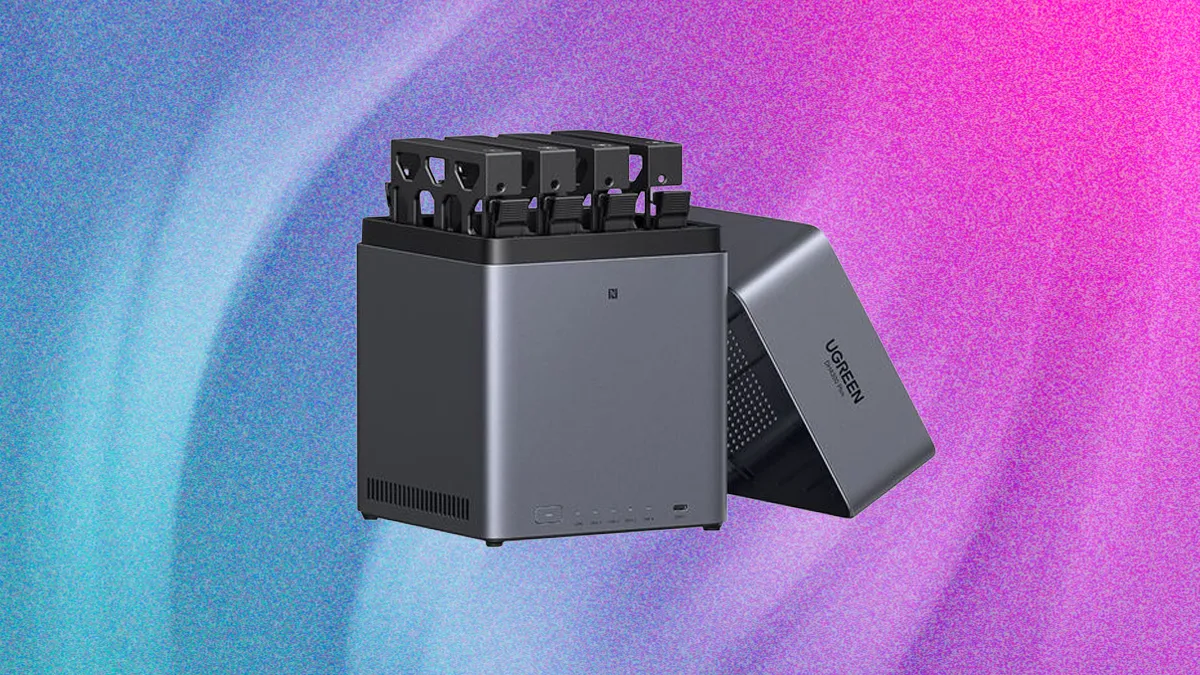
| UGREEN DXP4800 Plus | Creators and high-speed networks | 4 | 10GbE and 2.5GbE | Excellent hardware specifications |
| TerraMaster F4-424 Pro | Advanced and technical users | 4 | Dual 2.5GbE | Powerful processor and 32GB memory |
Synology DS225+: The Easiest Place to Start
The Synology DiskStation DS225+ is a sensible choice for someone building a private cloud for the first time. It is compact, has two drive bays, and combines 2.5GbE and 1GbE network connections.
Its main advantage is Synology’s DiskStation Manager operating system. The platform can manage shared folders, automatic computer backups, mobile photo uploads, file synchronization, remote access, snapshots, and compatible surveillance cameras through a relatively consistent interface.
With two equal-capacity drives configured for redundancy, the NAS can continue operating after one drive fails. This reduces downtime, but it also means approximately half the installed raw capacity is available before formatting and system overhead.
The two-bay format is ideal for personal documents, household backups, and moderate photo libraries. Creators working with large video projects or businesses expecting rapid data growth should consider a four-bay model instead.
- Choose it for: Straightforward administration, home backups, photos, and private file sharing
- Consider an alternative if: You need more than two bays or plan to run demanding applications
QNAP TS-264: A More Flexible Two-Bay System
The QNAP TS-264 is designed for buyers who want more hardware flexibility from a compact enclosure. Its Intel Celeron N5095 processor is accompanied by 8GB of DDR4 memory in the currently listed configuration.
Two 2.5GbE ports provide fast network connectivity, while two M.2 NVMe slots allow compatible solid-state storage configurations. A PCIe slot opens the door to additional expansion, and the HDMI output creates possibilities for locally connected media or display applications.
QNAP’s QTS software includes file synchronization, snapshots, backup tools, multimedia applications, containers, VPN services, and surveillance features. There is plenty to explore, although the larger selection of settings can require more learning than a simpler consumer-oriented platform.
The TS-264 is particularly appealing if your private cloud will double as a media server or application platform. It remains a two-bay device, however, so storage expansion will eventually require larger drives or an additional enclosure.
- Choose it for: Media, containers, hardware expansion, and advanced home use
- Consider an alternative if: You prefer the simplest possible administration experience
Synology DS925+: A Private Cloud for a Growing Business
A business should usually start with more capacity and redundancy options than an entry-level two-bay appliance provides. The Synology DiskStation DS925+ supplies four primary drive bays, two 2.5GbE ports, and two M.2 NVMe slots.
The additional bays make it easier to balance storage capacity with drive-failure tolerance. They also give a company more room to expand without immediately replacing existing disks. If internal capacity is eventually exhausted, the DS925+ supports Synology’s compatible DX525 expansion unit.
Synology’s software makes the device useful as more than a shared office drive. It can centralize workstation backups, control employee access, synchronize files between locations, retain snapshots, and support surveillance-camera recording.
Before buying drives, consult Synology’s official compatibility list for this exact model. Supported-drive requirements can vary between NAS generations and may change with software policies.
- Choose it for: Business backups, shared folders, multiple users, and long-term expansion
- Consider an alternative if: Your main priority is built-in 10GbE connectivity
UGREEN DXP4800 Plus: Built for High-Speed Transfers
Photographers, video editors, and technology enthusiasts may be more interested in the hardware inside the UGREEN NASync DXP4800 Plus.
This four-bay system uses an Intel Pentium Gold 8505 processor and includes 8GB of expandable DDR5 memory. It also provides two M.2 NVMe slots, HDMI, a 2.5GbE network connection, and a significantly faster 10GbE connection.
That specification is attractive when transferring large RAW photo collections or video projects. However, the rest of the network must support those speeds. A compatible 10GbE switch or direct connection, suitable cabling, a fast client computer, and an appropriate drive configuration may all be required.
UGREEN’s UGOS Pro operating system is newer than the platforms offered by several long-established NAS manufacturers. Buyers should check that their preferred cloud-backup provider, mobile workflow, container application, and remote-access method are supported.
- Choose it for: 10GbE networking, large media files, strong hardware, and creative workflows
- Consider an alternative if: Software maturity and the widest application ecosystem are higher priorities
TerraMaster F4-424 Pro: Power for Advanced Workloads
The TerraMaster F4-424 Pro is aimed at users who expect their private cloud to handle substantially more than routine file storage.
It combines a four-bay design with an eight-core Intel Core i3-N305 processor, 32GB of DDR5 memory, two 2.5GbE ports, and two M.2 NVMe slots. Those resources are useful for containers, several concurrent users, indexing large libraries, and other memory- or processor-intensive workloads.
The F4-424 Pro runs TerraMaster’s TOS operating system, which provides storage management, snapshots, backup applications, remote access, and downloadable services. Experienced users may appreciate the hardware value, while beginners may find that a less powerful NAS with a more familiar software environment is easier to maintain.
- Choose it for: Containers, multitasking, demanding applications, and strong hardware value
- Consider an alternative if: You only need basic file and photo backups
What You Need to Build a Private Cloud
1. A NAS Enclosure
Choose the enclosure based on drive bays, processor, memory, networking, software, and future expansion—not simply the lowest purchase price.
2. Compatible NAS Drives
Most NAS enclosures are sold without storage drives. Check the manufacturer’s compatibility list before ordering. Common NAS-oriented drive families include Seagate IronWolf and WD Red Plus, but compatibility must still be confirmed for the exact drive and NAS model.
3. Suitable Networking Equipment
A 2.5GbE or 10GbE NAS will operate on many slower networks, but transfer speeds will be limited by the slowest connection in the path. Faster performance may require a multi-gigabit switch, network adapter, and appropriate Ethernet cables.
4. An Independent Backup
RAID is not a backup. It can protect availability after certain drive failures, but it cannot protect against theft, fire, ransomware, accidental deletion, or corruption that spreads to synchronized copies.
Keep another backup on external storage, a second NAS, or a trusted cloud service. Ideally, use the 3-2-1 approach: three copies of important data, on two types of systems or media, with one copy kept off-site.
5. A UPS Battery Backup
A compatible uninterruptible power supply can keep the NAS running briefly during an outage and allow it to shut down safely. This is especially important for a business system or any NAS that frequently handles writes and automated backups.
How to Secure Your Private Cloud
Owning the storage does not automatically make it secure. A NAS is a computer, and it requires routine maintenance.
- Install operating-system and application updates promptly.
- Use unique administrator credentials and multifactor authentication.
- Create separate accounts with only the permissions each user needs.
- Disable services and applications you do not use.
- Avoid exposing the NAS administration page directly to the internet.
- Use a reputable VPN or the manufacturer’s protected remote-access service.
- Enable snapshots where supported and maintain an offline or off-site backup.
- Test file restoration before an emergency occurs.
Frequently Asked Questions
Can a NAS completely replace Google Drive, Dropbox, or OneDrive?
It can replace many file-storage, synchronization, and sharing functions. However, you become responsible for uptime, security, backups, power, and internet connectivity. A hybrid approach—local NAS storage combined with encrypted cloud backup—is often the most resilient solution.
How many drive bays should I buy?
Two bays are sufficient for many households. Four bays provide better growth potential and more flexible RAID options, making them preferable for businesses, creators, and rapidly expanding media libraries.
Can I access a NAS while away from home?
Yes. Modern NAS platforms support remote access through manufacturer services, secure VPN connections, or manually configured networking. Whichever method you choose, enable multifactor authentication and avoid unnecessary direct internet exposure.
Does a faster NAS make file transfers faster?
Only when the rest of the system can keep up. Drive performance, RAID configuration, Ethernet speed, switches, cables, client storage, and file sizes all affect the final transfer rate.
Final Recommendation
For most first-time buyers, the Synology DS225+ provides the easiest route to a dependable private cloud. The QNAP TS-264 is more appealing to enthusiasts who want expansion options and multimedia flexibility.
Growing families and small businesses should consider starting with the four-bay Synology DS925+. For high-speed creative workflows, the UGREEN DXP4800 Plus offers impressive networking and hardware, while the TerraMaster F4-424 Pro is the strongest fit for advanced workloads.
The NAS is only the foundation. Compatible drives, secure configuration, tested backups, and reliable power protection are what turn it into a private cloud you can genuinely depend on.